BTE1522 – Innovation (Python) – Week 9 – BME 280

Exploring Temperature & Humidity Sensing with Python In Week 9 of our BTE 1522 Innovation (Python) class, we explored temperature and humidity sensing using Python programming. Let’s recap the key activities and learning outcomes from this week’s session: Activity 5 – Temperature & Humidity Sensor We learned about working with the I2C communication protocol, which … Continue reading “BTE1522 – Innovation (Python) – Week 9 – BME 280”

Exploring Temperature & Humidity Sensing with Python

In Week 9 of our BTE 1522 Innovation (Python) class, we explored temperature and humidity sensing using Python programming. Let’s recap the key activities and learning outcomes from this week’s session:

Activity 5 – Temperature & Humidity Sensor

We learned about working with the I2C communication protocol, which is commonly used for connecting and communicating with external sensors.
Reading data from external sensors and interpreting the sensor data were the main coding concepts covered in this activity.

Level up Activities

In the Level Up challenge for Week 9, students were tasked with building upon their knowledge from previous labs and enhancing their Python programs to incorporate additional features and functionalities.

1. Completed Lab 4 with BME 280 Sensor

Students revisited Lab 4, which involved reading ambient temperature, pressure, and humidity using the BME 280 sensor. This sensor is commonly used for environmental sensing applications and provides accurate measurements of these parameters.

2. Modified Codes to Incorporate Enhancements

  • Displayed Sensor Readings with Units: Students modified their Python codes to display temperature, pressure, and humidity readings with appropriate units. This enhancement ensured that the data presented to users was clear, informative, and easy to interpret.
  • Captured Data Every 6 Seconds: To enhance the data acquisition process, students adjusted their programs to capture sensor data at regular intervals of 6 seconds. This modification allowed for more frequent updates of sensor readings, enabling users to track changes in environmental conditions over time.
    Implemented Red LED Blinking for Temperature Readings: As a visual indicator of sensor activity, students incorporated red LED blinking whenever temperature readings were taken. This feature provided immediate feedback to users, indicating when temperature data was being sampled by the sensor.

3. Level Up Challenge: Displayed Data on an OLED Screen

  • In the ultimate level up challenge, students were tasked with integrating an OLED (Organic Light Emitting Diode) screen into their projects to display sensor data in real-time. OLED screens offer advantages such as high contrast, wide viewing angles, and low power consumption, making them ideal for displaying text and graphics.
  • By successfully implementing this feature, students elevated the functionality of their Python programs to a new level. Displaying sensor data on an OLED screen provided a visually appealing and intuitive way for users to monitor environmental conditions and interact with the system.

The level up activities encouraged students to innovate and enhance their Python programs beyond the basic requirements. By incorporating OLED display integration, students elevated their projects to a new level of sophistication. OLED displays provide a visually appealing way to present sensor data in real-time, offering clear and concise information to users. Through this enhancement, students not only demonstrated their mastery of sensor data acquisition and interpretation but also showcased their creativity in user interface design and data visualization. Overall, the level up activities served as a platform for students to explore advanced concepts and apply innovative solutions to real-world challenges, fostering a spirit of creativity and experimentation in their Python projects.


BTE1522 – Innovation (Python) – Week 8 – Assignment 1

Job well done everyone! In this assignment, students of BTE1522 are required to modify the Slider Game with the following requirements:- Multi-Enemy Challenge: Modify the code to introduce a second enemy with a different color and movement pattern. Students should ensure that collision detection works for both enemies and update the scoring accordingly. Angelina & … Continue reading “BTE1522 – Innovation (Python) – Week 8 – Assignment 1”

Job well done everyone!

In this assignment, students of BTE1522 are required to modify the Slider Game with the following requirements:-

  1. Multi-Enemy Challenge: Modify the code to introduce a second enemy with a different color and movement pattern. Students should ensure that collision detection works for both enemies and update the scoring accordingly. Angelina & Hui Zhi     

    https://x.com/angelina_lina05/status/1780980368713355396?t=OiP41KEI_H3ZtgVfFKuzPQ&s=08

  2. Power-ups Implementation: Add power-ups that appear randomly on the screen. When the player collides with a power-up, provide a temporary advantage such as increased speed or invincibility. Aerie & Eason


  3. Difficulty Levels: Implement different difficulty levels (easy, medium, hard) that adjust parameters such as enemy speed, player speed, and the rate of appearance of enemies. Salita & Huda 
  4. Obstacle Course: Introduce obstacles on the screen that the player must avoid colliding with. These obstacles should be placed randomly and have collision detection similar to the enemies. Syarah & Jia Hui

https://x.com/yIchiBaN1/status/1782343976680591540?t=QmEYhoxrJFqziV-SiZ5YsQ&s=08

Customizable Player: Allow the player to choose from different characters with varying sizes and colors. Ensure that collision detection and player movement are adjusted accordingly.  Farihin & 

  1. Endless Runner Mode: Modify the game to have an endless runner mode where the player continuously moves forward, and obstacles/enemies appear at increasing speeds. Implement a scoring system based on the distance traveled. Ashraf & Azhad
  2. Boss Battle: Design a boss enemy with unique characteristics and a health bar. The boss should have different attack patterns, and the player must defeat it to win the game. Implement scoring based on boss defeat time and remaining health. Aiman


….. and they did well. Congratulations!


BTE1522 – Innovation (Python) – Week 8 – Activity 3 GPIO LED Blinks

Hi BTE-ian,

This week, we looked into hardware construction and coding concepts, exploring fundamental skills essential for building interactive systems. The plan is o integrate GPIO (General Purpose Input/Output) pins and Python programming to control hardware components such as LEDs. 

Activity 3 – Delay, time sleep
In this activity, we look into the importance of timing in hardware control, specifically the time.sleep() function – introduce delays between actions, gaining insight into how timing impacts the behavior of hardware components. By constructing simple circuits and adjusting delay intervals, students developed a deeper understanding of the relationship between code execution and physical response.

Activity 4 – Controlling LED from Keyboard
Building upon the timing and GPIO control, we looked into interactive programming by controlling an LED using keyboard input. Conditional statements and event handling techniques, are applied, to manipulate the LED’s state based on user commands. This activity encourages students to explore the concept of user-driven interaction, laying the foundation for more complex control schemes in future projects.

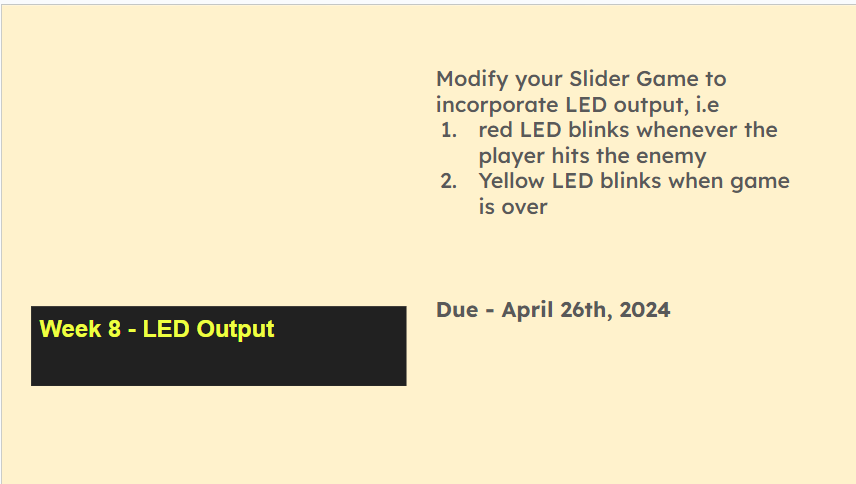
Challenge: Incorporating LED Output into the Slider Game:
Towards the end, students were tasked with enhancing their Slider Game project by integrating LED output, aiming at synchronizing LED behavior with game events, such as player collisions and game over conditions. Through creative problem-solving and iterative development, students aimed to create an immersive gaming experience where LED feedback enhances player engagement and provides real-time feedback.

Learning Outcomes:

  1. Understanding of basic hardware construction and GPIO control.
  2. Proficiency in controlling hardware components through Python code.
  3. Application of conditional statements and event handling in interactive programming.
  4. Integration of hardware output (LEDs) with software applications for enhanced user experience.


Research in Computer Education – Raspberry Pi Foundation

A very interesting seminars on computer science education researches. Brilliant speakers and works! AI Tools in Programming Classes Programming Design Concept K-5 Conceptual Transfer in Programming Language Data Literacy Assessing ScratchJr projects of young learners   Computing Research Playlist

A very interesting seminars on computer science education researches. Brilliant speakers and works!

  • AI Tools in Programming Classes

  • Programming Design Concept K-5

  • Conceptual Transfer in Programming Language

  • Data Literacy

  • Assessing ScratchJr projects of young learners


  • Computing Research Playlist

BTE1522 – Innovation (Python) – Week 5 – Revision and Assignment

Hi BTE-ian, This assignment is part of your class assessment. Do this in pair. So, what exactly does this assignment entail? Let’s break it down: Assignment Overview 1. Choose Your Innovation Your first task is to select one innovation from a list of exciting options. Whether you’re drawn to the idea of introducing power-ups, implementing … Continue reading “BTE1522 – Innovation (Python) – Week 5 – Revision and Assignment”

Hi BTE-ian,

This assignment is part of your class assessment. Do this in pair.

So, what exactly does this assignment entail? Let’s break it down:

Assignment Overview

1. Choose Your Innovation
Your first task is to select one innovation from a list of exciting options. Whether you’re drawn to the idea of introducing power-ups, implementing different difficulty levels, or designing a boss battle, there’s something for everyone. Discuss with your partner and choose the innovation that excites you the most.

The challenges are:-

  • Multi-Enemy Challenge: This challenge involves modifying the Slider Game code to introduce a second enemy with a different color and movement pattern. In this innovation, students will need to expand the game’s enemy mechanics to accommodate the presence of two distinct enemies on the screen simultaneously. This may require creating separate variables to track the position, color, and movement patterns of each enemy. Additionally, students must ensure that collision detection is updated to detect collisions with both enemies and adjust the scoring system accordingly. This innovation adds complexity to the game by introducing diversity in enemy types, enhancing the gameplay experience and providing players with new challenges to overcome.
  • Power-ups Implementation: This challenge involve implementing power-ups into the Slider Game. Power-ups are special items that appear randomly on the screen and provide the player with temporary advantages when collected. This innovation requires students to design power-up objects with unique properties such as increased speed or invincibility. They must integrate logic to spawn power-ups at random intervals and locations on the screen. When a player collides with a power-up, they should experience the temporary advantage granted by the power-up. This addition adds an element of strategy to the game as players must strategically collect power-ups to gain an edge over the obstacles and enemies they encounter.
  • Difficulty Levels: This challenges focuses on implementing different difficulty levels in the Slider Game. This innovation involves adjusting various parameters such as enemy speed, player speed, and the rate of appearance of enemies to create different levels of challenge for players. Students will need to introduce logic to dynamically adjust these parameters based on the selected difficulty level (easy, medium, or hard). Easy levels may feature slower enemies and fewer obstacles, while hard levels may ramp up the speed and frequency of enemy appearances. By providing players with a choice of difficulty levels, this innovation enhances the game’s accessibility and replay value, catering to a wider range of player skill levels.
  • Dynamic Enemy Spawning: This task involves introducing dynamic enemy spawning into the Slider Game. Unlike the original game where enemies appear only at the top of the screen, this innovation involves modifying the code to have enemies spawn from random positions along the top edge. Students must ensure that enemies move downward toward the player, posing a continuous threat throughout the game. By introducing randomness into enemy spawning locations, this innovation adds unpredictability to the gameplay, requiring players to adapt quickly to changing enemy positions and movement patterns.
  • Obstacle Course: This challenge involves implementing an obstacle course in the Slider Game. This innovation involves introducing obstacles on the screen that the player must avoid colliding with. Obstacles should be placed randomly and have collision detection similar to enemies. Students will need to design obstacle objects with collision detection mechanisms to detect collisions with the player. By adding obstacles, this innovation increases the complexity of gameplay, requiring players to navigate through a maze of hazards while avoiding both enemies and obstacles. This introduces a new layer of challenge and strategic decision-making for players.
  • Customizable Player: This challenge involves implementing a customizable player feature in the Slider Game. This innovation allows players to choose from different characters with varying sizes and colors. Students will need to adjust collision detection and player movement mechanics to accommodate different player characters. By providing players with the ability to customize their avatar, this innovation enhances player engagement and personalization, allowing players to tailor their gaming experience to their preferences.
  • Endless Runner Mode: This challenge involves to develop an endless runner mode for the Slider Game. In this mode, the player continuously moves forward, and obstacles/enemies appear at increasing speeds. A scoring system based on the distance traveled will be implemented to track the player’s progress. This innovation introduces a sense of urgency and excitement to the gameplay as players strive to survive for as long as possible while overcoming progressively difficult challenges. It also encourages ‘replayability’ as players compete to achieve higher scores with each playthrough.

2. Implement Your Innovation
Once you’ve chosen your innovation, it’s time to roll up your sleeves and get coding! Dive into the Slider Game codebase and make the necessary modifications to bring your innovation to life. This is where your creativity and problem-solving skills will truly shine as you navigate the intricacies of game development.

3. Record and Explain Your Changes
As you work on implementing your chosen innovation for the Slider Game assignment, don’t forget to document your progress with a video walkthrough. Explain the changes you’ve made and the thought process behind them. This not only solidifies your understanding of the code but also serves as a valuable learning resource for your peers.

Once your video walkthrough is ready, upload it to the @UMPSTEM Lab Twitter Twitter account. Here, you’ll have the opportunity to share your work with your classmates and receive feedback from them. Remember, engaging with your peers’ videos and leaving thoughtful comments will not only enhance your learning experience but also earn you bonus marks!

4. Prepare and Submit Your Report
Finally, compile your findings, explanations, and code into a comprehensive report. Your report should include an introduction, a description of the modification done, visual outputs (such as screenshots or diagrams), and a discussion of your findings. Be sure to submit your report on the KALAM platform and provide a hardcopy to your instructor before the deadline April 22nd 2024.

What’s the Aim of This Assignment?
Hands-On Learning: This assignment offers a hands-on opportunity to apply your Python programming skills in a real-world context. By working on a game development project, you’ll gain practical experience and deepen your understanding of Python concepts.

Creativity and Innovation: Choosing and implementing your innovation allows you to unleash your creativity and innovative thinking. Whether you’re designing new gameplay mechanics or enhancing existing features, this assignment encourages you to think outside the box and push the boundaries of what’s possible.

Collaboration and Communication: Working with a partner fosters collaboration and communication skills. Use this opportunity to exchange ideas, brainstorm solutions, and support each other throughout the development process.

Personal Growth: As you tackle the challenges of game development, you’ll inevitably encounter obstacles and setbacks. Embrace these challenges as opportunities for growth and learning. Remember, every bug you squash and every feature you implement brings you one step closer to mastery.

This assignment is not just about coding—it’s about creativity, innovation, and personal growth. It’s about pushing yourself beyond your comfort zone and discovering what you’re truly capable of. So, embrace the challenge, unleash your imagination, and let’s make something amazing together!

I can’t wait to see the incredible innovations you’ll bring to life in the Slider Game. Remember, the sky’s the limit, and the journey ahead is bound to be an unforgettable one.

Happy coding, and may the Python be with you!

Nurul

BTE1522 – Innovation (Python) – Week 4 – Act 6 7

Today’s class on BTE1522 – Innovation (Python), we continue the exciting journey of Slider Game development through Activities 6 and 7. The focus centered on implementing a game timer and a game over function in the game, enriching the understanding of essential coding concepts while enhancing our gaming experience. In Step 6, a game timer … Continue reading “BTE1522 – Innovation (Python) – Week 4 – Act 6 7”

Today’s class on BTE1522 – Innovation (Python), we continue the exciting journey of Slider Game development through Activities 6 and 7. The focus centered on implementing a game timer and a game over function in the game, enriching the understanding of essential coding concepts while enhancing our gaming experience.

In Step 6, a game timer is introduced, injecting an element of urgency and time management into our game dynamics. As we looked into this concept, we explored the means of tracking time within the game environment and orchestrating specific events based on elapsed time.

Step 7 propelled us into the intricacies of timing systems, where we fine-tuned our game mechanics to ensure a fluid and immersive gameplay experience. This step demanded a delicate balance of coordination, as we synchronized various game events, including character movements and enemy appearances.

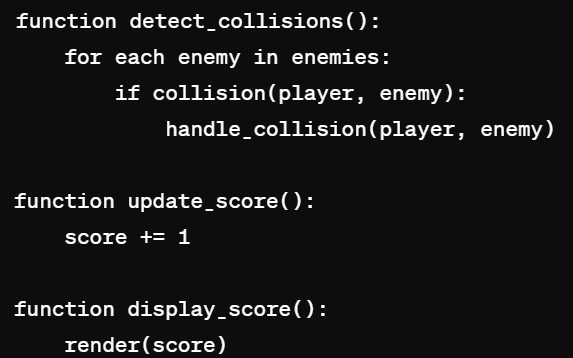
A pseudo-code for the overall codes:-

Assignment

Here is the details of the Assignment that should be completed by April 22nd, 2024.

BTE1522 – Innovation (Python) – Week 3 – Act 4 5


Hi BTE1522 Innovators,

As we progress further into our journey of Python game development, let’s recap on the activities that we did in Week 3. In today’s class, we delved deeper into the of game mechanics, focusing on creating enemies with dynamic behaviors and implementing collision detection and scoring systems. 

Step 4 – Enemy Properties and Movements
This week, we stepped into the enemy creation. Through a series of challenges, we defined enemy characters and choreograph their behaviors using control flow concepts. By employing loops and conditional statements, we created enemy movement patterns and characteristics. This step not only serve as a platform to practice your programming skills but also sparked our creativity as we brought our enemies to life within the game world.

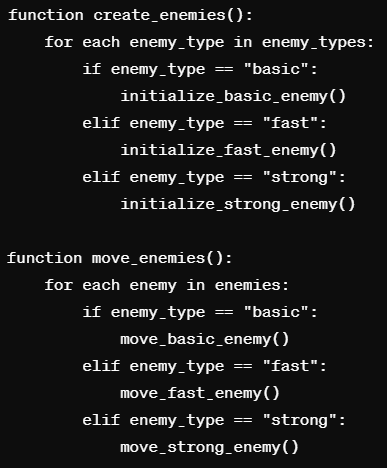
Pseudocode of Activity 4


Step 5 – Collision Detection & Scoring
With enemies ‘falling from sky’, the next challenge was to implement collision detection and scoring systems. Through careful application of control flow concepts, we simulated gravity and regulated the descent rate of falling enemies. Additionally, we developed algorithms to detect collisions between the player character and enemy entities, adding a layer of excitement and challenge to our game. Here, we compared the position of enemy and player to define collision.

As we fine-tuned our collision detection mechanisms, we celebrated each successful collision as validation that our code was correctly programmed. This step not only enhanced the gameplay experience but also sharpened our problem-solving skills as we navigated through the complexities of game development. The satisfaction of overcoming challenges and witnessing the seamless interaction between game elements served as motivation to push further in our Slider Game development journey.

Python Concepts 
Throughout today’s activities, we reinforced essential Python concepts, including operators and expressions, strings, functions, and control flow. By applying these concepts in the context of game development, we deepened our understanding and appreciation for their versatility and practical applications. From manipulating enemy properties to orchestrating complex game mechanics, our Python skills continue to evolve, empowering us to tackle increasingly sophisticated challenges.

Week 3 In Class Activity


Looking Ahead
As we reflect on the accomplishments of today’s class, let’s look forward to the endless possibilities that lie ahead. With each line of code we write and each challenge we overcome, we inch closer to realizing our vision for our Python game masterpiece. As we continue to explore advanced game mechanics and unleash our creativity, let’s embrace the journey with enthusiasm and determination.

Stay tuned for more exciting adventures as we continue to push the boundaries of Python game development in BTE1522 Innovation.

BTE1522 – Innovation (Python) – Act 1 2 3

Hi BTE 3232 Innovators, In today’s class, we’ve ventured into a simple game development, utilizing the powerful Pygame library to bring our ideas to life. Let’s recap the key pseudo codes we’ve explored, simplifying them for better understanding. Step 1 – Setting Up the Game Window The first step in any game development endeavor is … Continue reading “BTE1522 – Innovation (Python) – Act 1 2 3”

Hi BTE 3232 Innovators,

In today’s class, we’ve ventured into a simple game development, utilizing the powerful Pygame library to bring our ideas to life.

Let’s recap the key pseudo codes we’ve explored, simplifying them for better understanding.

  • Step 1 – Setting Up the Game Window
    The first step in any game development endeavor is setting up the game window. In our case, we defined the dimensions of our game window using the Pygame library, specifying its width and height. This step is crucial as it establishes the canvas on which our game will unfold. Understanding the pixel system in Python is vital here, as it allows us to position game elements accurately within the window.

We defined the dimensions of our game window using the Pygame library, specifying its width and height in pixels. This step is crucial as it establishes the canvas on which our game will unfold, ensuring that every pixel is utilized effectively. Understanding the pixel system in Python is vital here, as it allows us to position game elements accurately within the window.


  • Step 2 – Defining the Player
    With the game window in place, we turned our attention to defining the player character. Using variables to represent properties such as color, width, height, and starting position, we laid the foundation for our protagonist. This step is essential as it breathes life into our game, providing us with a central element around which the gameplay will revolve. Understanding how to manipulate these variables using Python operators and expressions allows us to customize our player character to suit our game’s requirements.


  • Step 3 – Implementing Player Movements

With the player character defined, the next logical step was to implement player movements. Through keyboard interaction, we enabled our players to control the protagonist’s movements within the game window. By listening for keyboard events and responding accordingly, we ensured smooth and intuitive gameplay. This step highlights the importance of control statements, particularly conditional statements like if, elif, and else, which allow us to handle various user inputs and dictate the character’s behavior in different scenarios.

Next class will be:-
As we continue our journey in BTE 3232 Innovation, we’ve laid a solid foundation for our game development endeavors. Understanding the basics of setting up the game window, defining player characters, and implementing player movements is crucial as we dive deeper into more complex game mechanics and features. With each step forward, we inch closer to realizing our vision for our very own slider game.

Stay tuned for more exciting adventures as we explore advanced concepts and unleash our creativity in Python game development!