Well done Haikal for progressing well in completing in PSAD work.

The world is digital, but life is analog..
Well done Haikal for progressing well in completing in PSAD work.
Well done Haikal for progressing well in completing in PSAD work.


I had the incredible opportunity to be in Petrosains KLCC in a a pre-workshop focusing on developing a learning module for an AI line tracer. Hosted by a team of experts (Dr Fauzan and Aein) in robotics and AI technology, the workshop deals with the innovative process of retrofitting an existing Arduino robot with a camera module to enable advanced image processing capabilities.
The centerpiece of the workshop was the integration of a camera module, specifically the ESP Cam, into the Arduino robot. This integration was facilitated through a serial connection, utilizing a soft serial approach to convert digital pins into serial inputs. Before attaching the ESP Cam to the Arduino, the camera module underwent initial coding to capture images using the AIthinker ESP camera module. These captured images were then fed into an AI image processing platform called Edge Impulse (https://edgeimpulse.com/) , where the magic truly began.
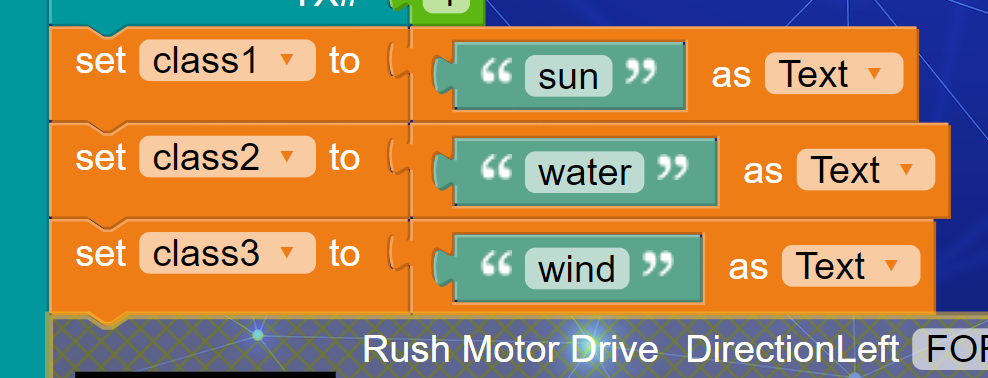
The task at hand was to train the system to detect specific images, namely images representing wind, water, and sun. This process, known as clustering, involved training the Edge Impulse platform with the collected images. Edge Impulse, as one of the available web AI platforms, utilizes sophisticated algorithms to process and classify images. Once the images were trained, Edge Impulse generated an Arduino library with AI image classification capabilities, enabling the Arduino robot to recognize and respond to the detected images.
The integration of the AI image processing module into the Arduino robot was a meticulous process. Due to the limited number of pins on the Arduino Nano, a soft serial approach was employed to establish communication between the ESP Cam and the Arduino. This involved coding two digital pins to serve as a transmit (TX) and receive (RX) interface for the serial connection.
Using a block programming approach known as Tinkercode, the Arduino robot was programmed to follow a line track while simultaneously activating the camera to “see” images. Additionally, the gripper mechanism on the robot was coded to release or block whenever the right image was detected, adding an extra layer of functionality to the system.
The workshop – master class – brought another perspective of robotics education, showcasing how AI image processing can be seamlessly integrated into Arduino-based systems. With the ability to detect and respond to visual stimuli, Arduino robots equipped with AI capabilities hold immense potential in various applications, from automated manufacturing to environmental monitoring. This serve as a perfect playground to nurture interest and skills in digital making skillsets =).
Nurul – May 7th, 2024




Exploring Temperature & Humidity Sensing with Python In Week 9 of our BTE 1522 Innovation (Python) class, we explored temperature and humidity sensing using Python programming. Let’s recap the key activities and learning outcomes from this week’s session: Activity 5 – Temperature & Humidity Sensor We learned about working with the I2C communication protocol, which … Continue reading “BTE1522 – Innovation (Python) – Week 9 – BME 280”


Exploring Temperature & Humidity Sensing with Python
In Week 9 of our BTE 1522 Innovation (Python) class, we explored temperature and humidity sensing using Python programming. Let’s recap the key activities and learning outcomes from this week’s session:
Activity 5 – Temperature & Humidity Sensor
We learned about working with the I2C communication protocol, which is commonly used for connecting and communicating with external sensors.
Reading data from external sensors and interpreting the sensor data were the main coding concepts covered in this activity.
Level up Activities
In the Level Up challenge for Week 9, students were tasked with building upon their knowledge from previous labs and enhancing their Python programs to incorporate additional features and functionalities.
1. Completed Lab 4 with BME 280 Sensor
Students revisited Lab 4, which involved reading ambient temperature, pressure, and humidity using the BME 280 sensor. This sensor is commonly used for environmental sensing applications and provides accurate measurements of these parameters.


2. Modified Codes to Incorporate Enhancements
3. Level Up Challenge: Displayed Data on an OLED Screen
The level up activities encouraged students to innovate and enhance their Python programs beyond the basic requirements. By incorporating OLED display integration, students elevated their projects to a new level of sophistication. OLED displays provide a visually appealing way to present sensor data in real-time, offering clear and concise information to users. Through this enhancement, students not only demonstrated their mastery of sensor data acquisition and interpretation but also showcased their creativity in user interface design and data visualization. Overall, the level up activities served as a platform for students to explore advanced concepts and apply innovative solutions to real-world challenges, fostering a spirit of creativity and experimentation in their Python projects.


Discussion on Undergraduate Research Project
Discussion on Undergraduate Research Project


Another interesting presentation on Computational Thinking
Another interesting presentation on Computational Thinking


An interesting webinars by MCMC and the researchers in this webinar series. Malaysian Communications And Multimedia Commission (MCMC) | Suruhanjaya Komunikasi dan Multimedia Malaysia (SKMM) – Communicate@MCMC and Broadcast Talk Series 1/2024 Communicate@MCMC & BTS_Programme Booklet
An interesting webinars by MCMC and the researchers in this webinar series.
Communicate@MCMC & BTS_Programme Booklet


